
How to create a WhatsApp product catalog
WhatsApp product catalogs must live in the same Meta business portfolio as your WhatsApp Business account, with vertical Commerce. Create the catalog in Meta Commerce Manager or during WhatsApp Embedded Signup, then open Catalogue in AvenPing and click Link.
Prerequisites
- A connected WhatsApp Business line in AvenPing. See How to connect WhatsApp Business to AvenPing.
- Admin access to the Meta business portfolio that owns that WhatsApp Business account (WABA).
- For Embedded Signup: permission to reconnect or complete Meta signup from AvenPing (Settings → WhatsApp or Dashboard Connect WhatsApp).
Why not create from inside AvenPing?
Creating catalogs through partner Marketing API calls often fails when the catalog sits under a different business manager than the client WABA (cross-BM / advertising policy). Meta expects the catalog on the same portfolio as the WABA.
Method 1: Commerce Manager (recommended)
Open Commerce Manager in the correct portfolio
Sign in to Meta Commerce Manager. Switch to the same business portfolio that owns your WhatsApp Business account (the portfolio you used when connecting WhatsApp to AvenPing).Create a commerce catalog
Create a new catalog. Choose a commerce / product catalog suitable for WhatsApp shopping (not a non-commerce asset type). Accept any catalog terms Meta shows if this is the first catalog on the portfolio.Connect the catalog to WhatsApp (optional in Meta)
In Meta WhatsApp Manager or Commerce settings, you can attach the catalog to the WABA. You can also skip Meta-side linking and use AvenPing in the next step.Link the catalog in AvenPing
Sign in at app.avenping.com. Open Catalogue. If the line has no catalog yet, the Link a catalog to WhatsApp overlay lists owned catalogs. Select yours and click Link. Refresh the page if a brand-new catalog does not appear yet.
Method 2: Embedded Signup — create a new catalogue
Use this when you prefer to create the catalog while reconnecting WhatsApp through Meta’s Facebook Login for Business flow.
Start Embedded Signup from AvenPing
Open Settings → WhatsApp and use Connect WABA / reconnect, or use Connect WhatsApp on the Dashboard. Complete Facebook Login for Business until you reach Select the business assets to share with AvenPing.Choose Create a new catalogue
Keep (or select) the Business portfolio that owns your WhatsApp account. Open the Catalogue dropdown and select Create a new catalogue, then click Next.
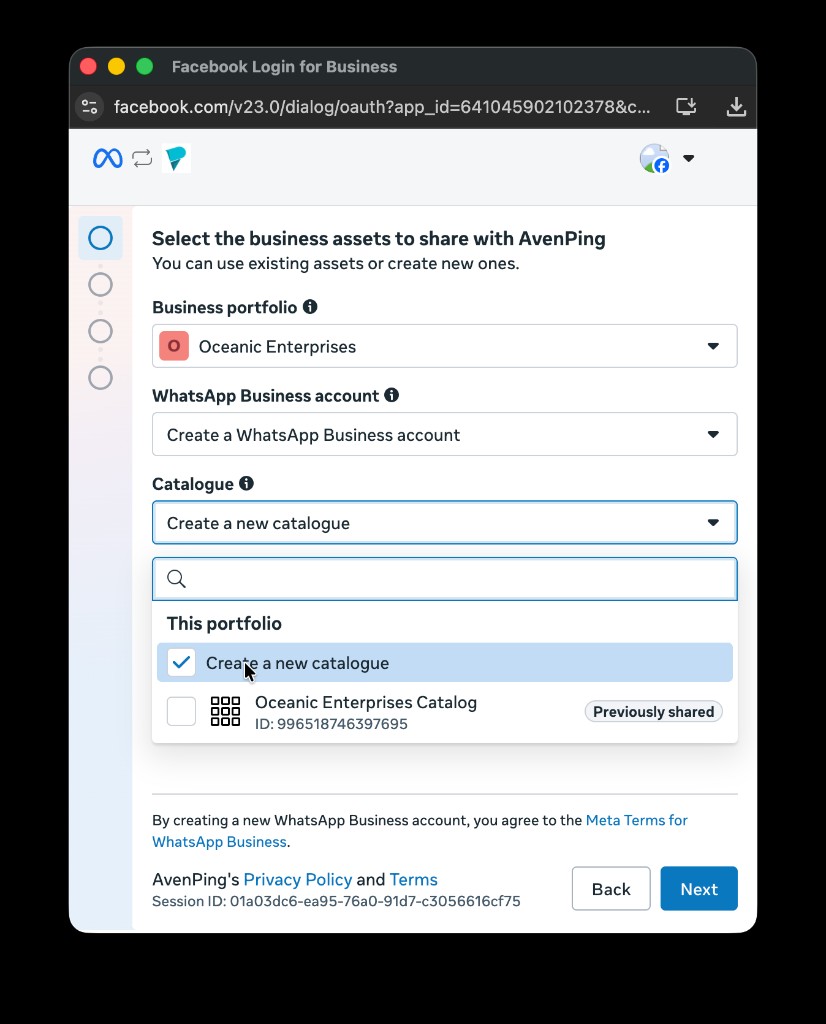
Embedded Signup → Select assets: Catalogue → Create a new catalogue.
- Set Category to Commerce (required)
On Enter business information for new assets, open Category and select Commerce. Do not leave Generic selected — WhatsApp product catalogs need the Commerce vertical.
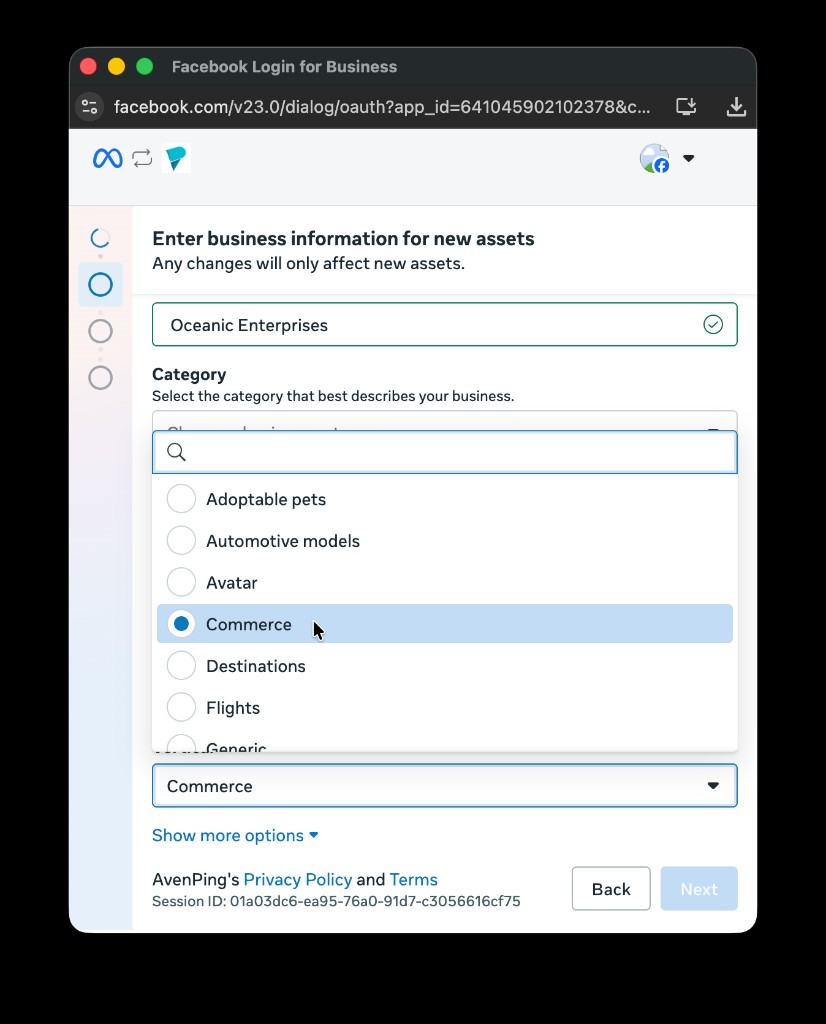
Select Commerce as the category for the new catalogue.
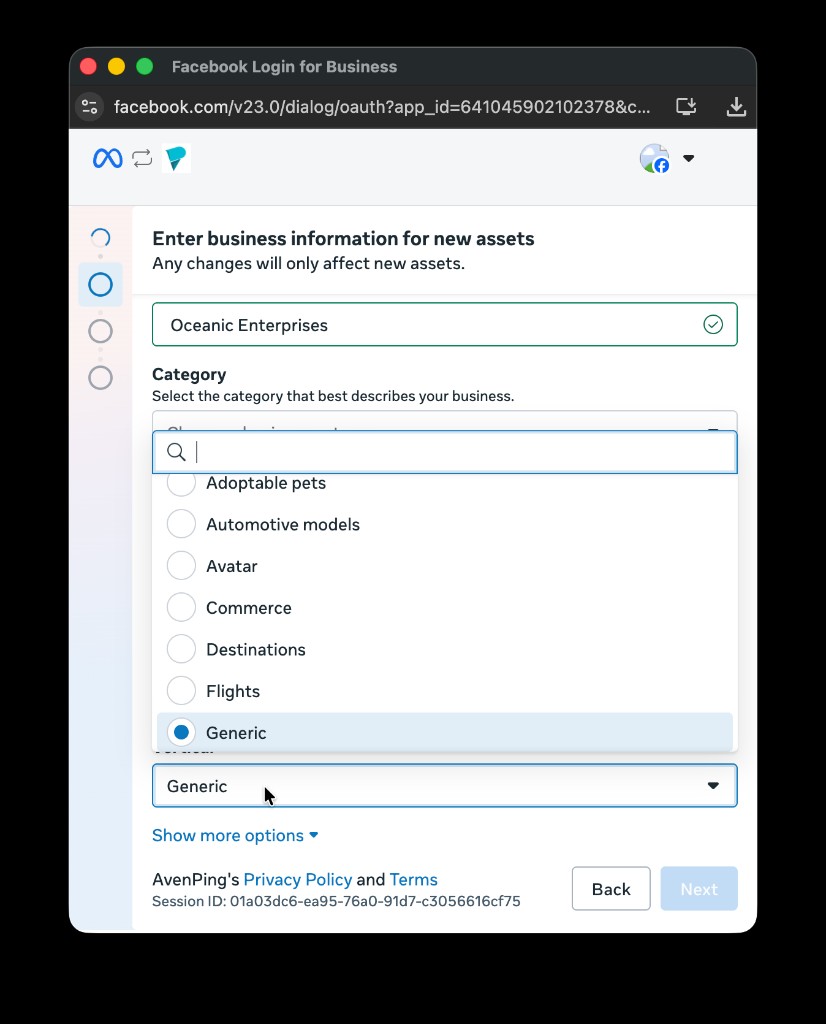
Avoid Generic. If you see Generic selected, change it to Commerce before continuing.
- Finish signup
Click Next and complete the remaining Meta steps. When you return to AvenPing, open Catalogue. The new catalog should appear in the link overlay — click Link.
WARNING
Category must be Commerce. Generic (and other non-commerce categories) will not work correctly as a WhatsApp product catalog for AvenPing Catalogue, inbox catalogue messages, or catalogue templates.
Step-by-step (after the catalog exists)
Open Catalogue
In AvenPing, open Catalogue. Pick the WhatsApp line in the page line filter if you have more than one.Link the catalog
When the overlay Link a catalog to WhatsApp appears, choose the catalog and click Link. If you dismissed the overlay earlier, use Link catalog on the banner.Add or sync products
Continue with How to add products to a WhatsApp catalogue or How to sync from Google Sheets or Shopify.Confirm in Catalogue settings
Open the Commerce / settings section on Catalogue to confirm the linked catalog name and ID for that line.
FAQ
Why must the catalog be on the same business portfolio as the WABA?
Meta ties WhatsApp product catalogs to the business portfolio that owns the WABA. Catalogs created under a different (for example partner) business manager often cannot be linked reliably because of cross-business and advertising policy rules.
Why must the category be Commerce?
WhatsApp shopping and product messages expect a commerce catalog vertical. Choosing Generic (or another vertical) during Embedded Signup creates an asset that will not behave as a WhatsApp product catalog in AvenPing.
The overlay says no catalogs found. What now?
Create the catalog with Method 1 or Method 2 above, wait a moment for Meta to finish provisioning, then reload Catalogue. Confirm you are signed into the same Meta portfolio and AvenPing line that owns the WABA.
Can I create a catalog with a button inside AvenPing?
No. AvenPing links catalogs you already own in Meta. Use Commerce Manager or Embedded Signup to create them, then Link in Catalogue.